
This is a self-service enrolment Wi-Fi service:
Once activated you will have one year’s access to guest Wi-Fi on campus. After that year you will need to re-register.
You can register more than one device with the same email. Follow the same process for each device.
Some older devices (e.g. with Windows 7) may not automatically direct you to the sign up page, please follow the links below to access the sign up pages.
If you would like the University to remove your records from the guest Wi-Fi system, please email help@chi.ac.uk from the account you wish to be removed stating the request in the email.
- From your device select the UoC-Guest wireless network and click connect
- Once connected you will be automatically diverted to the registration page
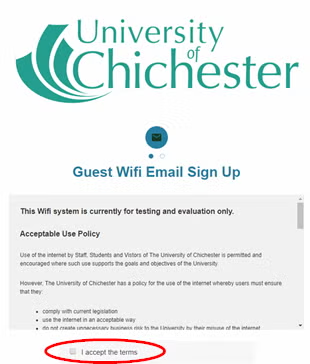
- Read the acceptable use policy, if you accept the policy, click the I accept the terms check box
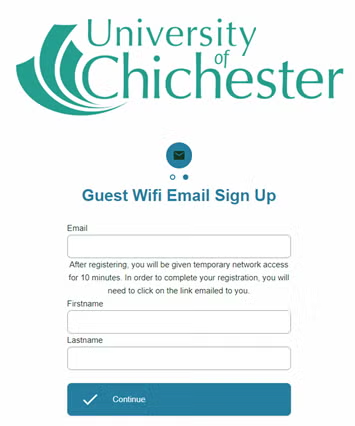
- On the sign up page enter your email address, first name, and last name and click continue
- You now have 10 minutes of temporary internet access, in order to complete your registration
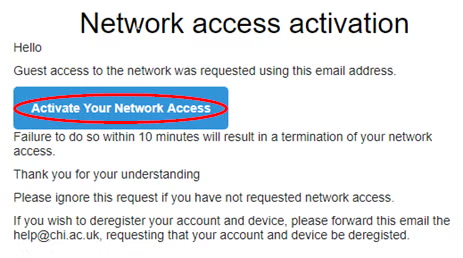
- Open your emails and click on the ’email activation required’ email, from UoC-Guest@chi.ac.uk (you may need to check in your junk folder)
- In the email. click the activate your network account access button to confirm your registration
Once activated you will have one year’s access to guest Wi-Fi on campus. After that year you will need to re-register.
You can register more than one device with the same email. Follow the same process for each device.
Some older devices (e.g. with Windows 7) may not automatically direct you to the sign up page, please follow the links below to access the sign up pages.
- If connecting please navigate directly to https://guestlogin.chi.ac.uk.
If you would like the University to remove your records from the guest Wi-Fi system, please email help@chi.ac.uk from the account you wish to be removed stating the request in the email.
Glide Copy link #
Glide is only for use in halls of residence (including B&B customers) You will need to enrol on Glide before you can use Wi-Fi in halls of residence. Glide also have a support page.Updated on June 17, 2026